Invoice photo capture
Staff photograph each invoice page in their phone's browser. Nothing to download.
ProfitPlus inventory app · Built by a restaurant operator
ProfitPlus is a restaurant inventory and food-cost app built by a working restaurant GM. Your crew photographs every delivery, your item list builds itself from it, and every Monday you see what you used, what it cost, which vendor raised prices and what to order. 30 days free, then $49 a month per location. No setup fee, no contract.
Guarantee: find at least $1,000 a year in vendor savings in your first 60 days, or your money back. How it works

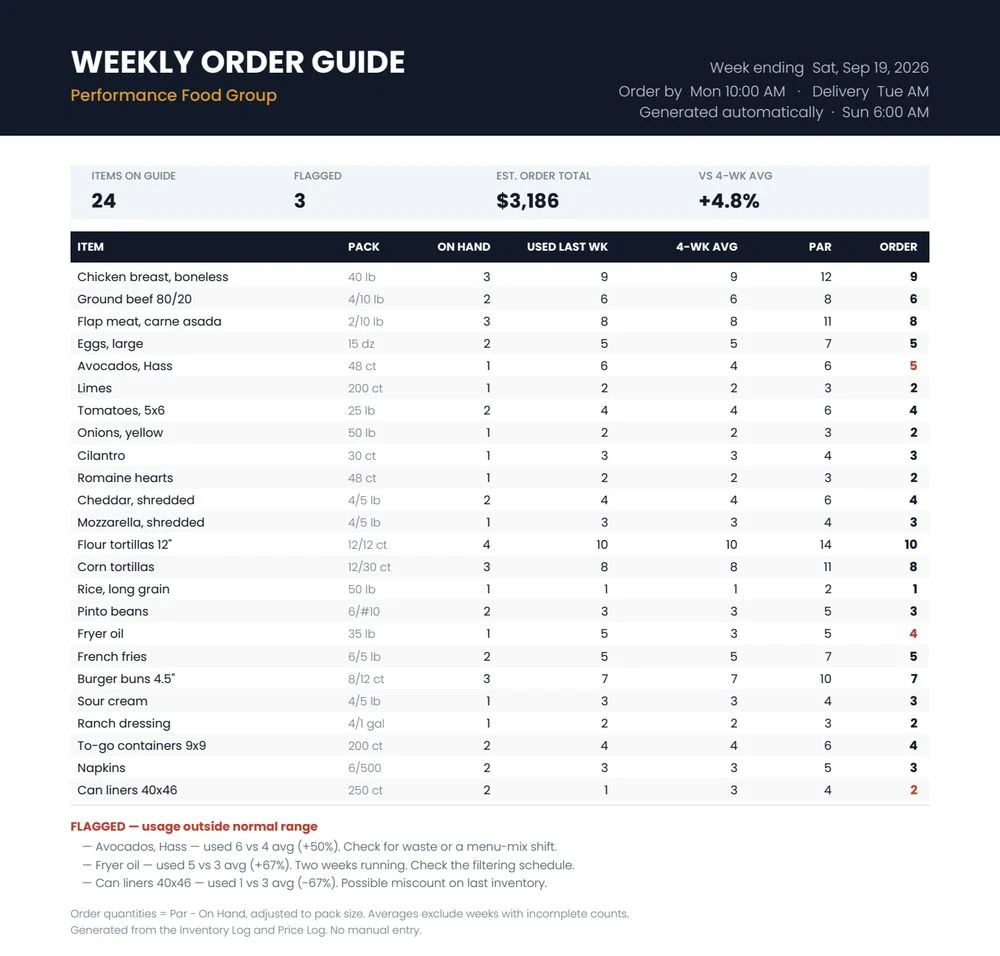
| Item | Pack | On hand | Used last wk | 4-wk avg | Par | Order |
|---|---|---|---|---|---|---|
| Chicken breast, boneless | 40 lb | 3 | 9 | 9 | 12 | 9 |
| Eggs, large | 15 dz | 2 | 5 | 5 | 7 | 5 |
| Avocados, Hass | 48 ct | 1 | 6 | 4 | 6 | 5 |
| Flour tortillas 12" | 12/12 ct | 4 | 10 | 10 | 14 | 10 |
| Fryer oil | 35 lb | 1 | 5 | 3 | 5 | 4 |
| To-go containers 9x9 | 200 ct | 2 | 4 | 4 | 6 | 4 |
| Napkins | 6/500 | 2 | 3 | 3 | 5 | 3 |
| Can liners 40x46 | 250 ct | 2 | 1 | 3 | 4 | 2 |
Showing 8 of 24 rows · Sample data
ProfitPlus runs in your staff's phone browser, with nothing to download. A link and a store PIN is the whole setup.
I built this for my own kitchen first, to capture invoices, track vendor prices and write our order guides. ProfitPlus is the finished version, ready for yours: free for 30 days, then month to month.
Works in any phone's browser. Nothing to download.
Every Monday morning it's ready in ProfitPlus, built from what you actually used, not what someone remembers.
None of this takes a big software platform. It takes a system that does the watching for you.
ProfitPlus
Staff photograph each invoice page in their phone's browser. Nothing to download.
Items, quantities and prices are read from the photo and logged, so nobody retypes invoice lines.
Every purchase price is kept by item and vendor, so you can compare vendors side by side.
A price that jumps past your limit gets flagged instead of hiding in next month's P&L.
On-hand counts and received product turn into recent and average usage for every item.
Current prices and real usage show what is driving food cost, not just the monthly percentage.
A suggested order for each item, worked out from par levels, on-hand counts and average usage.
Items used far above or below normal are flagged, so waste, over-portioning or a miscount gets caught early.
The systems are built from day-to-day restaurant operations, then measured against the problem they are supposed to solve.
~30%over recipe usage, one ingredient
Inventory, invoice capture, vendor price tracking and automatic order guides made abnormal usage visible enough to act on, inside a real restaurant. Results depend on your menu, volume and starting point.
ProfitPlus: 30 days free, then $49/month per location, everything included. No setup fee, no add-ons, no contract.
ProfitPlus
Your weekly inventory report comes with a suggested Order column: par minus on hand, based on your average usage. Open it, check it, place the order.
| Item | On hand | Par | Order |
|---|---|---|---|
| Chicken breast, boneless | 3 | 12 | 9 |
| Avocados, Hass | 1 | 6 | 5 |
| Flour tortillas 12" | 4 | 14 | 10 |
| To-go containers 9x9 | 2 | 6 | 4 |
Free trial
30days free
Try it on your real invoices
Then
$49/month per location
No setup fee, no contract
Find at least $1,000 a year in vendor savings in your first 60 days, or your money back.
For restaurants buying from two or more vendors. Savings are the price difference between your vendors on the same item, times your average weekly usage, times 52, from your own invoices. The 60 days start the day you go live and include your 30-day free trial. If it falls short, tell me and I'll refund your first month's $49.
30-day free trial. No contract. Cancel anytime.
Start your free trialCheck your current food cost with the free restaurant food cost calculator →
Inventory software typically runs $239 to $350 a month, and you still have to set it up and keep it mapped. ProfitPlus is $49, and the item list builds itself from your invoices.
Software figures are typical rates for a single location in 2026 and vary by plan.
Labor Forecaster & Staffing Planner
Most restaurants lose money on labor because the schedule is built on habit, not on the sales that are actually coming. The Labor Forecaster & Staffing Planner:
See the Labor Forecaster & Staffing Planner →Try the free labor cost & SPLH calculator →
Outside restaurant operations, I also build custom tools for repetitive business workflows: data entry, invoices, Google Sheets, dashboards, forms and quote calculators.
Website and Google Business audits, full website builds, and YouTube or social-media advertising are available as standalone services for restaurants and local businesses.
Sign up at profitplusapp.com in about a minute. No setup fee, no sales call.
Every line becomes an item with one tap, so your item list builds itself from what you actually buy. Send staff a link and a store PIN to help scan and count.
What you used, what it cost, what to order and which vendor raised prices. Free for 30 days, then month to month.
I'm a working restaurant GM, not a software company. Eight years in the foodservice industry. Everything on this page runs in a real kitchen every week, used by staff who didn't sign up to learn software.
Use these free tools for quick calculations, then let ProfitPlus keep the same numbers current from your invoices and counts. No email or login.
Yes, after a 30-day free trial: $49 a month per location, with everything included. No setup fee, no add-ons, no per-invoice charges and no contract, and you get an email 3 days before your trial ends.
If you buy from two or more vendors and it doesn't find at least $1,000 a year in vendor savings in your first 60 days, tell me and I'll refund your first month's $49. Savings are the price difference between your vendors on the same item, times your average weekly usage, times 52, from your own invoices. The 60 days start the day you go live and include your 30-day free trial.
Weekly. Food cost is the one variable cost that can swing a lot in a single week, and a monthly count finds the leak a month too late. If a full count takes too long, count your high-dollar items every week and the rest once a month. ProfitPlus's quick count picks your 10 biggest-spend items from your invoices: about 15 minutes on a phone.
A spreadsheet works until nobody has time to type into it. ProfitPlus fills in the numbers from invoice photos and does the math every week, and you can export everything to a spreadsheet anytime.
Your account goes read-only and your data stays yours: you can download everything as spreadsheets. If you cancel during the 30-day free trial, you aren't charged.
No. ProfitPlus works in your phone's browser and installs to your home screen in two taps, on iPhone and Android.
No. You send them a link and a store PIN. They can photograph invoices, count and log waste, nothing else. They never see prices, costs or reports.
Yes. Each location keeps its own items, counts and pars, all under one login, at $49 per location.
No. Usage comes from your counts and your invoices, so your numbers work from the first week. No recipes to build, nothing to connect.
No. It works with the vendors and systems you already use.
Me. You reach a real person by phone, text or email, not a support bot.
Yes. ProfitPlus works anywhere, and the labor planner and custom automation builds happen remotely. Around Watsonville I'm happy to come in.
Questions about ProfitPlus, the labor planner or a custom automation build? Tell me a little about your business. I'll call or text you within a day.
Ready to try ProfitPlus? Start your free trial, no call needed.
Guarantee: at least $1,000 a year in vendor savings in your first 60 days, or your money back. Details