Weekly inventory tracking
Track beginning inventory, received product, ending inventory and usage in one repeatable workflow.
Restaurant inventory management
A custom restaurant inventory system connects purchasing, weekly counts, usage and ordering so the numbers stay useful instead of becoming another spreadsheet staff has to rebuild.
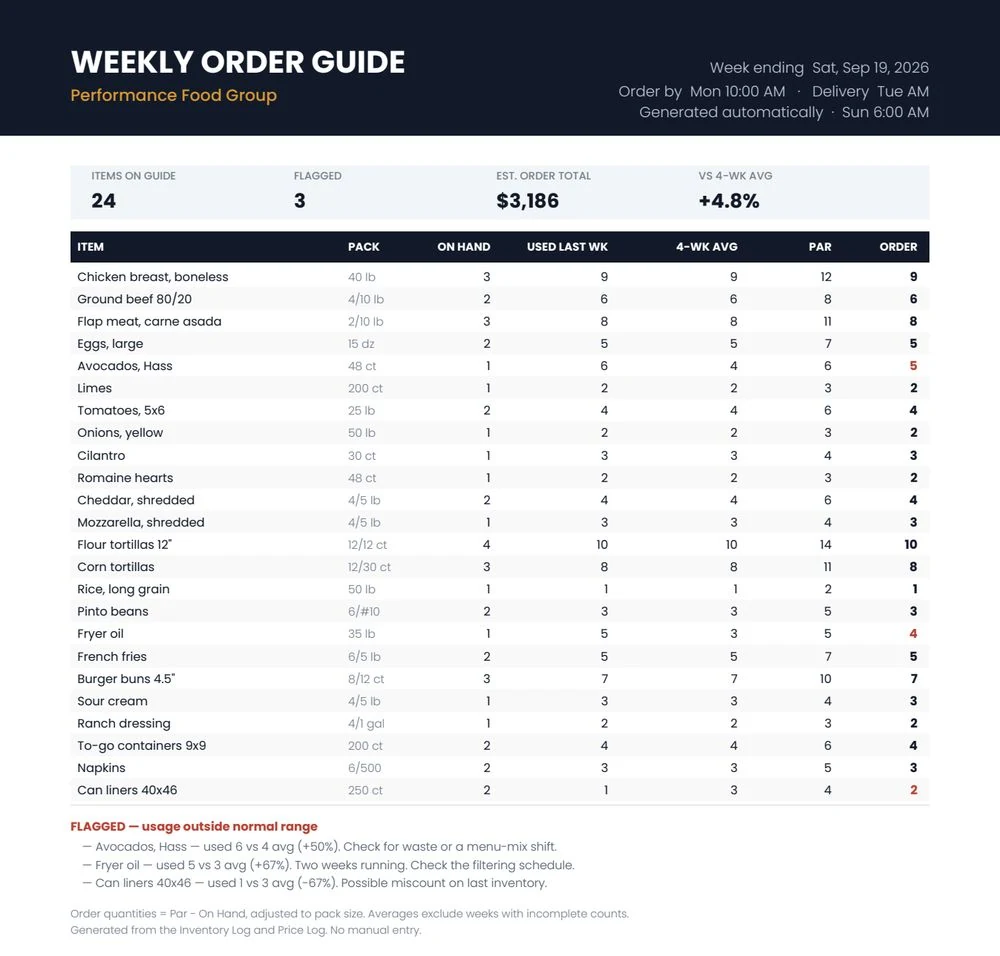
The useful question is not just “what is on the shelf?” It is what you started with, what came in, what was used, what changed in price, and what you need next.
Track beginning inventory, received product, ending inventory and usage in one repeatable workflow.
Surface items that move outside their normal usage range so waste, over-portioning or count problems are easier to investigate.
Keep the most recent purchase price visible instead of relying on an old average that hides price creep.
Use current stock, recent usage and par targets to calculate what should be ordered.
Invoice data or receiving entries update quantities and prices.
Your weekly count feeds the same dataset instead of living in a separate sheet.
The system calculates usage, flags unusual movement and prepares an order guide.
The system can be adapted to the way your restaurant buys, counts and orders instead of forcing your staff into a generic inventory platform.
Keep the POS and vendors you already use.
The core system is built for your operation rather than sold as another permanent subscription.
Operating data can remain in accounts and spreadsheets you control.
Inventory usage and current vendor pricing give you the inputs needed for better food-cost analysis.
Use these free tools for quick calculations, then connect the same numbers to your invoices, inventory and recipes if you want them to update automatically.
A connected inventory and ordering workflow documented $22,000 in waste reduction.
At minimum, beginning inventory, purchases or receipts, ending inventory, usage and current item cost. The exact workflow should match how your restaurant counts and orders.
No. The system can be built around phones, spreadsheets and lightweight web forms depending on the workflow.
No. It is designed to improve inventory and purchasing workflows around the systems you already use.
Yes. Invoice capture can extract quantities and prices and feed them into the inventory and vendor-price workflow.
The custom build is generally a one-time project. Optional AI invoice-reading usage may have its own small usage cost.
The fastest way to know whether a custom system makes sense is to look at the current process, where time is lost, and which numbers you need to trust.