Inventory tracking
Track on-hand quantities, received product and weekly usage without rebuilding the same spreadsheet every week.
Restaurant Operations Systems
Restaurant owners usually feel the problem before they know what software to search for: food cost creeps up, vendor prices change unnoticed, inventory takes too long, orders rely on memory, or labor is scheduled without a dependable sales forecast. I build custom systems around those exact workflows so the numbers stay current without adding another complicated monthly platform.
These systems are organized around operational questions, not software buzzwords.
A useful inventory system should do more than count what is on a shelf. It should connect what you bought, what you used, what it cost, and what you need to order next.
Track on-hand quantities, received product and weekly usage without rebuilding the same spreadsheet every week.
Keep ingredient and purchasing costs current so food-cost decisions are based on recent prices rather than an old average.
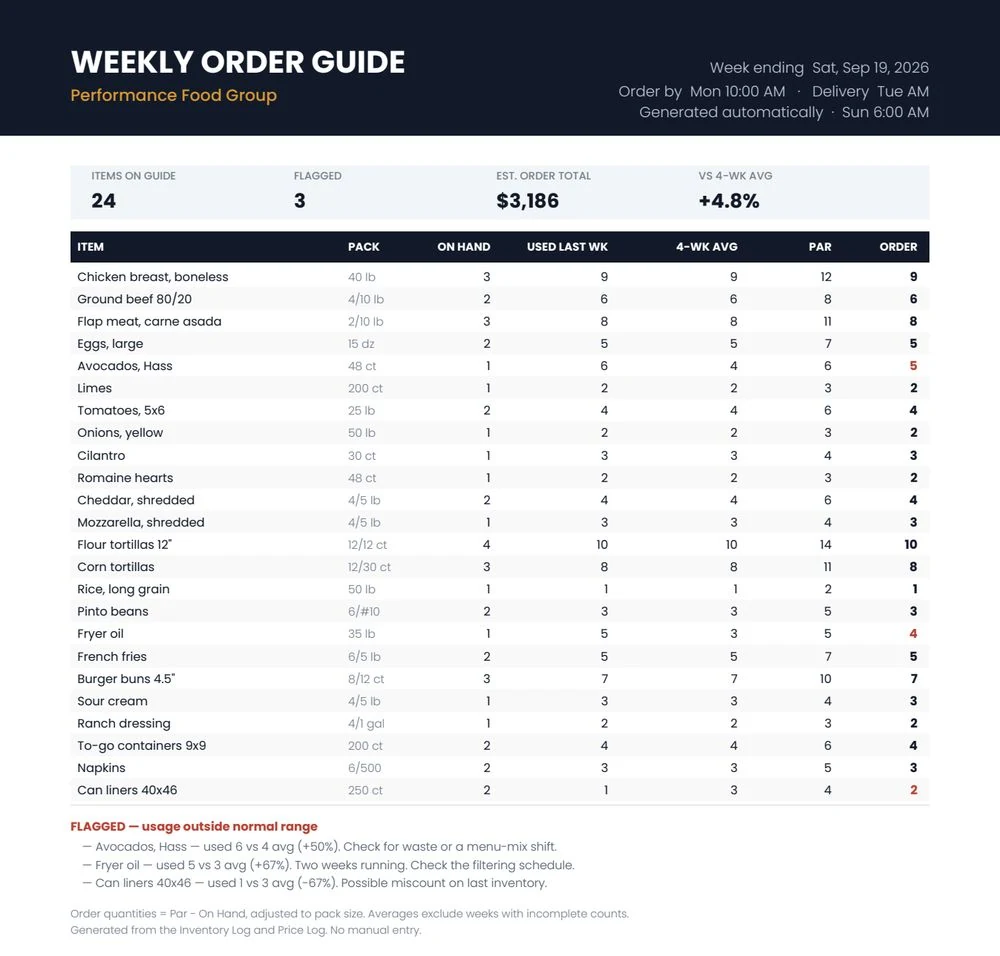
Use recent usage and current stock to calculate what should be ordered instead of relying on memory.
Flag items whose usage moves outside the normal range so over-portioning, waste or count problems get attention sooner.
Explore the restaurant inventory system → Restaurant food-cost control →
Photograph the invoice instead of typing every line. Item, quantity and price data can feed the same operating system that tracks inventory and purchasing.
Inventory is only one side of operations. Forecasting upcoming sales gives you a better starting point for purchasing, prep and labor decisions.
Use your historical sales pattern and relevant operating inputs to estimate upcoming demand by day.
Translate expected sales into labor-dollar or sales-per-labor-hour targets before the schedule is finalized.
See where staffing is heavy or light relative to expected demand instead of judging the schedule only after payroll closes.
Forecasting, purchasing and labor can be built as connected workflows rather than isolated spreadsheets.
The build begins with how invoices, counts, ordering and scheduling actually happen in your restaurant.
You do not have to adopt a large platform just to get one useful workflow automated.
The system can live in accounts you control, with one-time build pricing instead of a permanent software subscription.
See how these workflows were used in day-to-day restaurant operations.
Inventory, invoices, vendor pricing and ordering were connected into one workflow.
Seasonality, weather and events fed a daily forecast that became labor-hour targets.
Recipe cost and contribution margin were connected for pricing and reformulation decisions.
Use these free tools for quick calculations, then connect the same numbers to your invoices, inventory and recipes if you want them to update automatically.
It is a connected set of tools and workflows for restaurant inventory, food cost, invoices, vendor pricing, ordering, sales forecasting and labor planning, built around the restaurant's existing operation.
No. The point is to improve the workflows around the systems and vendors you already use rather than force a full technology replacement.
The systems are sold as one-time custom builds. Optional third-party services such as AI invoice reading may have their own small usage costs.
It can make price changes, inventory usage and purchasing patterns visible sooner. That gives you better information for investigating price creep, unusual usage, waste and ordering decisions.
Yes. Most of the setup and customization can be handled remotely. Local on-site work is also available around Watsonville and the Monterey Bay area.
If the problem is repetitive, measurable and currently lives in paper, spreadsheets or disconnected software, there is a good chance it can be simplified.